

Digital Banking
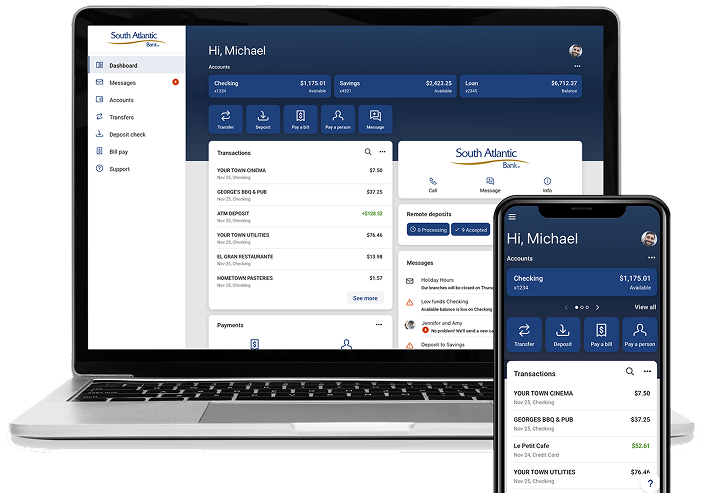
South Atlantic Bank’s digital banking platform allows you to be in control of your personal finances whenever you want, wherever you are.
Expect More from Digital Banking
Gain the Access You Deserve
Manage your accounts with confidence and convenience. Check balances, make payments, stop payments, transfer funds between accounts, view transaction history, and handle everyday banking tasks with ease. Our online banking platform gives you secure access to your accounts whenever and wherever you need it, helping you stay connected to your finances and in control of your money.
Features & Functionality
Manage Cards
Access debit card controls and alerts.
Remote Deposits
Deposit checks from your mobile device.
Alerts & Notices
Set specific alerts and notifications for each account.
Add Photos
Attach receipts to transactions for a visual record.
Secure Message
Get online support for transaction and account questions.
Make Payments
Pay a bill or pay a person within digital banking.
Access Documents
View and download e-statements and notices.
Transfers
Move money to and from SAB accounts.
Account Info
Quick access to balances, transactions, and statements.
Travel Notices
Set travel notices for your cards.
Take control of your finances today with Digital Banking.
Download our free app. *App Store® is a registered trademark of Apple Inc. Google Play and the Google Play logo are trademarks of Google LLC.
Frequently Asked Questions
Login
- Your existing username and password will work to log in.
- You must know your login credentials. Face ID and Touch ID will not work for the initial log in.
- If you don’t know your login credentials, please call us at 843.839.0100 to reset. The “forgot password” function will not work for initial log in to the new platform.
- You will be asked to provide a phone number to set up Two-Factor Authentication for account security.
- Two-Factor Authentication (2FA) protects your account information by asking users to provide two distinct forms of identification. You will choose to receive a one-time verification code by either text message to a mobile phone, call to the phone number entered, or through an authenticator app.
Mobile App
- Yes, you can download the South Atlantic Bank app through the Apple App Store or Google Play. If you open our current app, you will be prompted to download the new app.
- You must know your login credentials. Face ID and Touch ID will not work for the initial log in.
- You will be asked to provide a phone number to set up Two-Factor Authentication for account security.
- If you don’t know your login credentials, please call us at 843.839.0100 to reset. The “forgot password” function will not work for initial log in to the new platform.